
Making County Services Easier to Find
A focused information architecture study of how residents navigate the LaSalle County website
The LaSalle County website contains plenty of useful information. The challenge is finding it without already knowing which department handles the service—or which official term the county uses for it.
I examined several common tasks to see where the site helped residents and where its structure made them work harder than necessary.
Focus Areas
Project type: Independent information architecture study
My role: Research, information architecture, content strategy
Methods: Site audit, task-based usability testing, comparative review
Status: Early recommendations; not implemented
Scope: This was a focused exploratory study, not a full usability study. Findings are directional and would require additional testing before implementation.
What Made Me Look Closer
Government websites are often organized around the departments managing the information. Residents usually arrive thinking about something they need to do.
They don’t think, “I should visit the Assessment Office.” They think, “Can my mother get help with her property taxes?”
That led to my central question:
Can residents find important county services without already knowing which department owns them?
What I Examined
To keep the project manageable, I focused on the homepage, navigation, search, department pathways, and pages connected to four resident tasks:
- Get a marriage license
- Find property-tax help for a senior homeowner
- Dispose of an old television
- Register to vote
I audited the task paths, compared parts of the experience with the DuPage County website, and conducted one early task-based usability session.

What I Found
Task-based language worked when it was visible
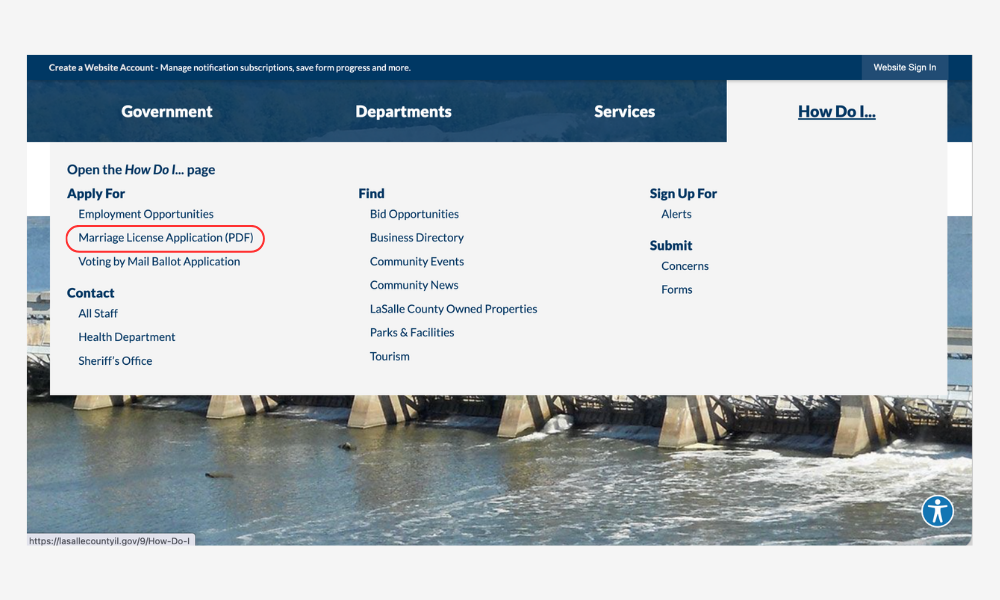
For the marriage-license task, the participant initially moved toward search. Then she noticed “How Do I” and said:
“I don’t even need to go to the search bar.”
She selected the marriage-license link and found the information immediately. The task-based label matched the way she was thinking about her goal.
Department navigation required too much organizational knowledge
After that success, she tried using Departments to find senior property-tax help.
The large dropdown confused her. She initially interpreted it as a full page, looked for a way to scroll, and repeatedly lost the menu when her cursor moved outside it.
She eventually searched for “property tax exemption” and found the information—but only after switching strategies and using the county’s terminology.
Finding the topic didn’t always produce a clear next step
For voter registration, search led to information stating that online registration was closed. The next path introduced terms including “jurisdiction” and “grace period.”
The participant became increasingly uncertain and eventually abandoned the task. She had reached the correct subject area, but the content didn’t clearly explain what she should do next.
My comparison with DuPage County reinforced the same general pattern: a prominent “How Do I” feature made tasks easier to begin, but official terminology still created friction around senior property-tax assistance.
The Direction I Explored
The early evidence didn’t justify replacing the department-based navigation. That structure remains useful for staff and residents who already understand county government.
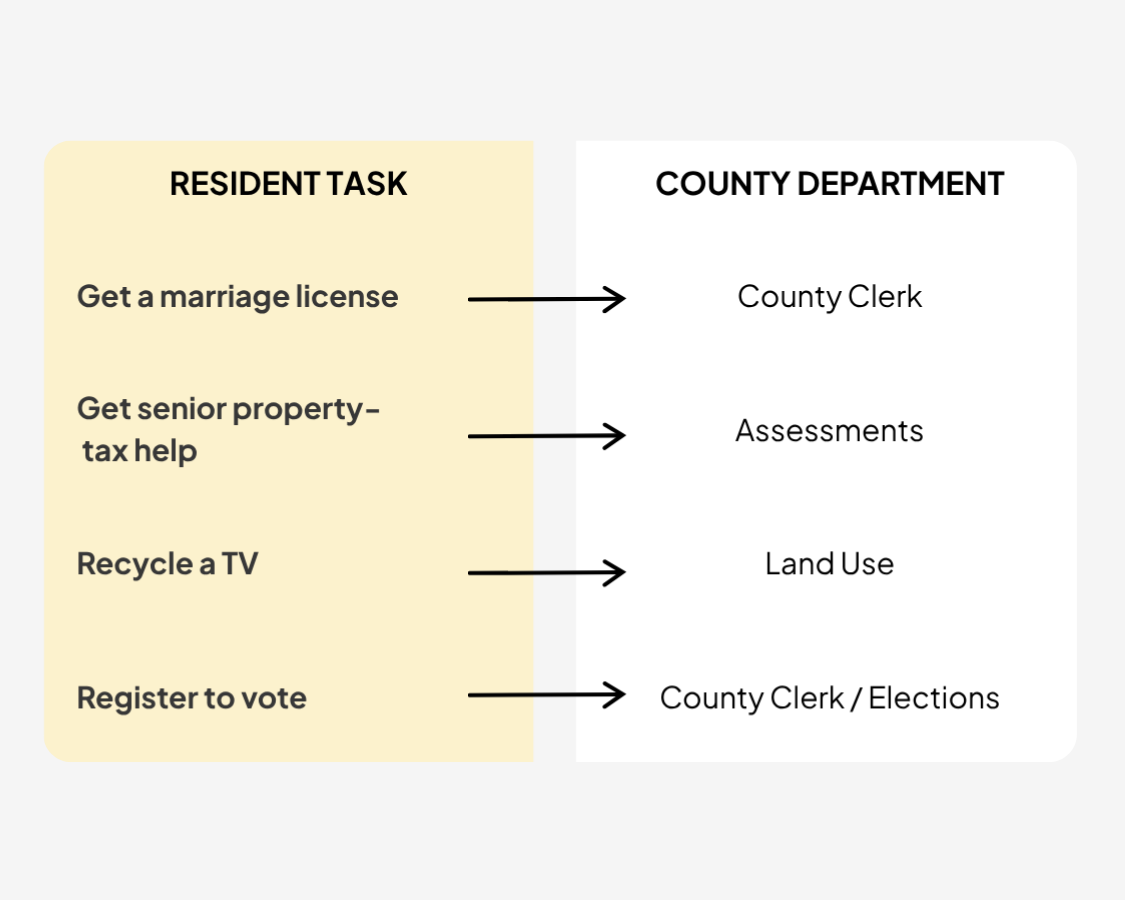
Instead, I would add a stronger task-based layer connecting resident language to the department responsible for the service.
Each task would lead to a consistently structured service page explaining eligibility, requirements, costs or deadlines, steps, forms, and contact information.
Residents could begin with what they need to accomplish without having to understand the county’s organizational chart first.
What I Would Test Next
I would tree-test the proposed task labels with additional residents to see whether they could identify the correct path and where they hesitated.
I would then test the service-page structure to determine whether people could understand the requirements and complete the task once they arrived.
What I Learned
This project made me more disciplined about separating observations from assumptions. A frustrating navigation experience can make an entire site seem broken, but the early evidence pointed toward a more focused opportunity.
Good information architecture doesn’t have to erase the organizational structure. It creates a bridge between the way an organization manages information and the way people actually look for it.
Let’s Connect
Find me on Linkedin, or click the button to email me directly!